TRAINING AND LEARNING WITH COMPUTERS
Interoffice memo
DATE: August 24, 2010
TO: Dan Hurley, CEO
FROM: Pam Bolton, Training Coordinator
SUBJECT: Training Package – How To Create A Website
Attached find the training module on “How To Create A Website”, and under separate cover, a power point presentation. The training package will include:
· An overview of the training module in a power point presentation to be utilized for:
o Customer sales
o In-house needs
· The training module, customizable to customer needs. covering 3 days:
o Instruction
o Practical application
o Optional – The material will contain information, with references, but it will outside the scope of this training. Sales could potentially utilize for additional training days.
·
A prerequisite for this training package is the
required completion of the training materials for Expression Web 3
· An optional 5 day course available.
Here is the outline of the training module:
Day 1
· Purpose or reason for a website
· How to present a website on the internet
· Create and register a domain name
Day 2
· Create a website layout and design, and a website site map
· Development of a Privacy Statement
Day 3
· Choose software that work for you
· Troubleshoot – test links
· Conclusion: Future Maintenance & Additional sources of information
·
A prerequisite for this training package,
completion is required of the training materials for Expression Web 3
I have scheduled the board room August 24 at 2pm to give an overview of this training material in a power point presentation. Our Sales, Information Technology, and Human Resource departments will assess the material to ensure it meets their needs. If any other departments need to be present, please let me know.
How To
Create A Website
Day 1
Purpose or Reason for the Website
The purpose for a website will be either business or personal. Think about the goals you want to accomplish with a website.
Optional. For a business website, the planning would include a plethora of information – audience, marketing, product/store, blog, forums, chats, email, etc. A business website would surpass the time allotment for three days training.
How to Present a Website on the Internet
Presenting a
website on the internet can be through a web hosting service and turning your
pc into a web server. Web host services
are optional, see below. “Turning your pc
into a web server takes more time to set up, it has the advantages of being
free and more flexible than other solutions.”
Our computers in
this lab provide access to emulate this functionality.
Optional. There are many web
hosting services. “Best 10 Web Hosting
Sites” provided an analysis of several web hosting services
· Can provide domain name resolution
·
Can provide
space on a server (lease or own) called data center
·
Can provide
web interface or control center to manage the server
·
Can provide
support
·
Can provide
web development
·
Can provide additional
services like email
Create and Register a Domain Name
Important! Pay particular attention to your ‘name’ as there are organizations and laws governing your domain name.
Optional. The Internet
Corporation for Assigned Names and Numbers is “a not-for-profit public-benefit
corporation with participants from all over the world dedicated to keeping the
Internet secure, stable and interoperable. It promotes competition and develops
policy on the Internet’s unique identifiers”.
Day 2
Create Layout, Design and Site Map
As I’ve always said, “One can change anything when using a computer, it is not set in stone.”
This is one of the most time consuming and
important aspects, so don’t be in a hurry. Utilizing the graph paper, create a site map,
like the following example
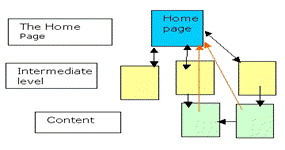
Using the above to personalize your
site map and the following layout and design, ask yourself some questions:
· One page or more
· What do I want to include or not include
· What graphics could I use
· Is it easy to read, navigate and find
· is there consistency in my design
· Revise layout until ready to proceed
Again on graph paper, setup how
you want each page to look; here is an example
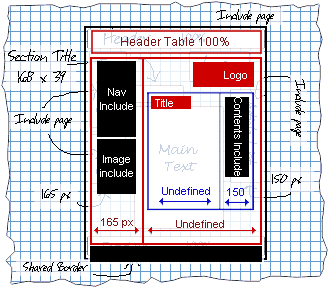
Optional. The software, Visio, can be utilized to do your site map or layout and design, rather than graph paper.
Web Developers are available for a fee and can provide the services of layout, design, site map and integration to your web host service.
Need ideas? Use some of your favorite websites or the following to assist in your design:
·
integrated articles and challenges peoples were
having and presented solutions
·
lots of design and layout options
·
tips and tricks for website layout
·
or a video to watch
Development of a Privacy Statement
The privacy statement is an area, not necessarily a law or policy, but it is a ‘best practice’. Please consider this list of information to be included in a privacy statement, but do not consider it as all inclusive:
· legal name
· site name
· contact information
· if you collect information, what are you doing to do with it?
· A slew of technological areas, examples: cookies, ip address
Homework. Draft a privacy statement. Again, check out your favorite websites or use the following for examples:
·
“Templetons.com
Privacy Policy” http://www.templetons.com/etc/privacy.html
·
“Build Your Website” http://www.build-your-website.co.uk/Privacy-Policy.htm
·
“Thomas Brunt’s Outfront Privacy” http://www.outfront.net/privacy.htm
·
“websiteGear Privacy Policy” http://www.websitegear.com/about/privacy.asp
· The government has to meet certain guidelines when doing any web publishing. Here is their requirement:
o
”All federal public websites* must comply with
existing laws and directives that address the need to protect the privacy of
the American people when they interact with their government. “
Day 3
Software
When making a decision of which software to use, don’t forget to look to the future of your website. The software may be confusing initially. Here are some examples of software available to create your website:
· Adobe Dreamweaver – most popular
· Composer
· Expression Web (Front Page) – free to students
· Trellian - free
· WordPress
· Visio Studio (graphic aspect) – free to students
Expression Web 3 is installed on your computer. Utilize Expression to:
· Create standards-based page layout, using CSS
· Create page layout from your design
Optional. Do you want to utilize forms, drop-down menus, etc.?
Troubleshoot – Test Links
At this point, please make a backup of all your hard work.
Troubleshoot – test, test, test!
Ask friends and family to take a test drive and check:
· Their first impressions
· Visual -- text, color, graphics, etc.
· Ability to navigate between items/pages
· Does site meet your expectations
Conclusion
Future Maintenance
The future of your website should contain regular ‘best practice’ maintenance, as for any computer.
· daily backups
· monthly and quarterly renovations
· Website looking tired – spruce it up with additional pages, change colors, adding graphics, and just about anything you need or want
· Research and play at hosting your own website
Optional. Depending on time
constraints and computer knowledge, initially utilizing a web host service is a
very inexpensive option. “Godaddy.com”
provides a step by step how to test your website
Additional Sources of Information. Find references to other sources for different aspects of a website.
Software is one of the crucial aspects of your website.
Web Design Software Reviews, Consumer Search, November 2008
Small business options:
Get a free website and more, Microsoft Office Live Small
Business (Build your website, Choose a domain, and Add email)
Online tools and services to help you build your business,
Microsoft Business for Small & Midsize Companies
Web hosting options:
Grow your hosting business, Microsoft Hosting
Microsoft Web Hosting
Web applications:
ASP.NET is a web application framework
Web developers:
Build a Website Today!
Web design, banner ad design, color, creativity, inspiration,
design and layout, graphic design, fonts, graphics, logo design, and typography
Have fun creating your very own website!
Work Cited
Brunt, Thomas. Outfront. N.d. 11 August 2010.
Web. <http://www.outfront.net/tutorials_02/design/layout.htm>.
—. Privacy. N.d. 11 August 2010.
Web. <http://www.outfront.net/privacy.htm>.
Build a Website Today! N.d. 11 August 2010. Web.
<http://www.buildyoursite.com/>.
Consumer, Search. Web Design Software
Reviews. November 2008. 11 August 2010. Web. <.
http://websitesetupguide.com>.
Cope, Stephen. Build Your Website.
N.d. 11 August 2010. Web.
<http://www.build-your-website.co.uk/website-layout.htm>.
Expression, Microsoft. Learning
Expression Web. N.d. 11 August 2010. Web.
<http://expression.microsoft.com/en-us/cc197140.aspx>.
Get a free website. N.d. 11 August 2010. Web.
<http://smallbusiness.officelive.com/en-us/>.
Getting Started with Windows Shared
Hosting. N.d. 11 August 2010. Web.
<http://help.godaddy.com/article/1370>.
Grow your hosting business. N.d. 11 August 2010. Web.
<http://www.microsoft.com/hosting/en/us/default.aspx>.
Heng, Christopher. thesitewizard.com.
10 July 2010. 11 August 2010. Web.
<http://www.thesitewizard.com/domain/index.shtml>.
Host Your Own Website. N.d. 11 August 2010. Web.
<http://www.wikihow.com/Host-Your-Own-Website-for-Free and
http://www.youtube.com/watch?v=SYbskmfJVYs>.
How to make your own website template
design. N.d. 11 August 2010. Web.
<http://www.youtube.com/watch?v=QpjGaQ4f5X8>.
ICANN. 31 March 2010. 11 August 2010. Web.
<http://www.icann.org>.
Microsoft Web Hosting. N.d. 11 August 2010. Web.
<http://microsoftwebhosting.net/>.
Online tools and services to help you
build your business. N.d. 11 August
2010. Web.
<http://www.microsoft.com/business/en-us/products/officelivesmallbusiness/default.aspx>.
Privacy Policy. N.d. 11 August 2010. Web.
<http://www.websitegear.com/about/privacy.asp>.
Privacy Statement. N.d. 11 August 2010. Web.
<http://www.build-your-website.co.uk/Privacy-Policy.htm>.
Site Point. N.d. 11 August 2010. Web.
<http://articles.sitepoint.com/category/design-and-layout>.
Templeton, Brad. Brief Intro to
Copyright. N.d. 11 August 2010. Web.
<http://www.templetons.com/brad/copyright.html>.
—. Privacy Statement. N.d. 11
August 2010. Web. <http://www.templetons.com/etc/privacy.html>.
Web design +. N.d. 11 August 2010. Web.
<http://websitetips.com/design/>.
Web Development with Power,
Productivity and Speed. N.d. 11
August 2010. Web. <http://www.asp.net>.
WebContent.gov. N.d. 11 August 2010. Web.
<http://www.usa.gov/webcontent/>.
WebHosting Choice. 11 August 2010. 11 August 2010. Web.
<http://www.webhostingchoice.com>.
Website Design. N.d. 11 August 2010. Web.
<http://www.google.com/images?hl=en&rls=com.microsoft:en-us:IE-SearchBox&rlz=1I7ADFA_en&q=website+design&revid=502500094&um=1&ie=UTF-8&source=univ&ei=h1dgTKH7CI32tgOHkIWqCw&sa=X&oi=image_result_group&ct=title&resnum=4&ved=0CD8QsAQwAw>.
websiteGear. N.d. 11 August 2010. Web.
<http://content.websitegear.com/article/layout.htm;>.